You’ve spent months building your app, tested it inside out, and you’re finally ready to ship. Then comes the part most development guides quietly skip over: actually getting your app published on the Play Store and App Store. There are fees, requirements that have changed lately (especially on Google Play), and enough paperwork to trip up a first-time publisher.
This guide breaks down the full app publishing cost in India for 2026, including the real fees, updated requirements, and the exact steps to get your app live on both stores.
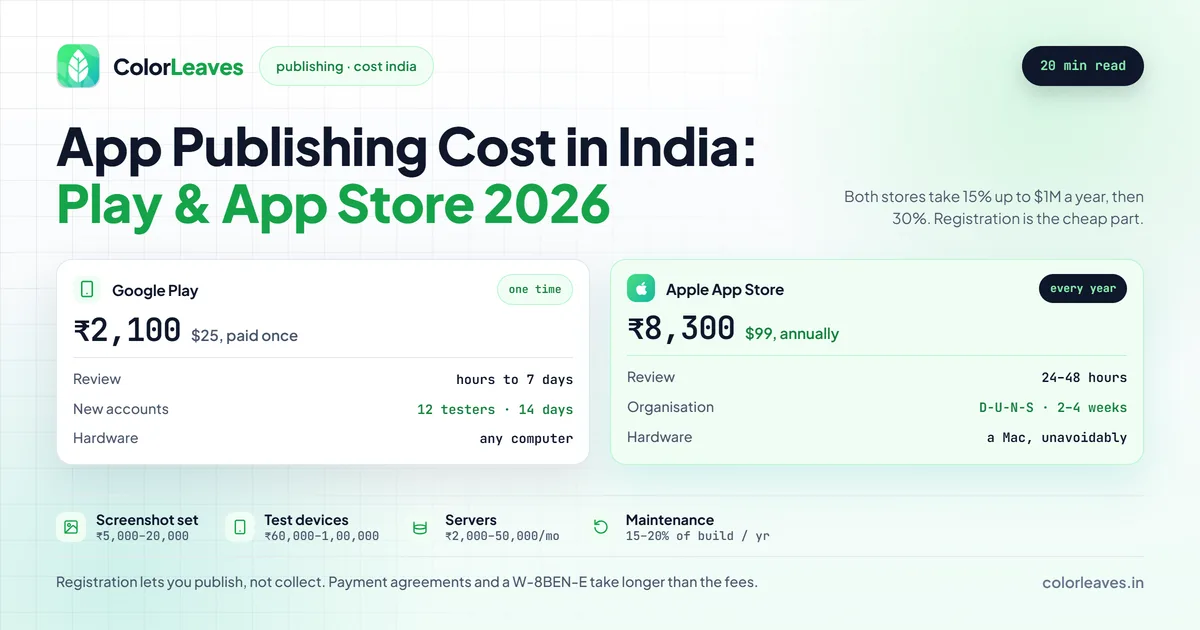
Key Takeaway: Publishing on the Google Play Store costs $25 (about ₹2,100) as a one-time fee, while the Apple App Store charges $99 (about ₹8,700) per year. Google also requires new accounts to complete a 14-day closed test with at least 12 testers before going live.
Google Play Store: Complete Publishing Guide
Targeting the Indian market? Android is almost always your first stop. At 95%+ market share (StatCounter), that’s an easy call. Here’s how the publishing process works in 2026.
Developer Account Cost
A Google Play Developer account costs $25 (approximately ₹2,100) as a one-time payment (Google). You pay once and the account stays active for good. No annual renewal. One account covers unlimited apps.
Payment can be made using an international debit or credit card. Google accepts Visa and Mastercard issued by Indian banks.
For the full account setup walkthrough, including verification and the new closed-testing requirement, see our Google Play Console developer account guide.
Individual vs Organization Account
When creating your developer account, you’ll choose between two account types:
| Feature | Individual Account | Organization Account |
|---|---|---|
| Cost | $25 one-time | $25 one-time |
| Verification | Government ID | D-U-N-S number + Government ID |
| Verification Time | 2-5 days | 5-10 business days |
| App Limit | Same | Same |
| Trusted Badge | No | Can be eligible |
| Best For | Indie developers, freelancers | Companies, startups, agencies |
Running a company or startup? Go with the Organization account. It reads as more professional, and Google has been extending organization accounts a bit more trust during review.
The New Testing Requirement (2025-2026)
This is the big one that catches most developers off guard.
Google now makes new developer accounts run a closed testing phase before they can publish to production. The rules:
- You must add at least 12 testers (using their email addresses)
- Those testers must actively opt in and install your app
- The testing period must last a minimum of 14 consecutive days
- Only after completing this testing phase can you apply for production access
This policy landed in late 2023 and has been enforced harder through 2025 and 2026. Google brought it in to cut down on low-quality and spam apps. Publishing under a brand new developer account? Build this two-week buffer into your app development timeline.
Pro tip: Start lining up testers the moment your app hits QA. Don’t wait for it to be “perfect.” You can keep pushing updates to the closed testing track all through the 14-day window.
Store Listing Optimization
Your store listing is what talks people into downloading, and the first two screenshots do most of that work because they are what shows in search results. If you are already paying for design on the app itself, having the same person do the store assets costs little and usually pays for itself in install rate. Get these ready:
- App Title: Up to 30 characters. Include your primary keyword naturally.
- Short Description: Up to 80 characters. This appears in search results.
- Full Description: Up to 4,000 characters. Write naturally, include keywords, and highlight features.
- Screenshots: Minimum 2, recommended 8. Show your app’s best screens. You’ll need phone screenshots at minimum, and tablet screenshots if your app supports tablets.
- Feature Graphic: 1024 x 500 pixels. This banner appears at the top of your listing.
- App Icon: 512 x 512 pixels. High-res PNG with no transparency.
- Video (optional): A YouTube URL for a promo video. This can significantly boost conversion.
Content Rating Questionnaire
Google requires every app to complete the IARC (International Age Rating Coalition) content rating questionnaire. It takes about 5 to 10 minutes. You answer questions about your app’s content (violence, language, mature themes, and so on) and the system assigns an age rating automatically.
Skipping this step or answering dishonestly can get your app suspended, so be accurate.
Review Process and Timeline
Google’s review usually runs a few hours to 7 days for most apps. New developer accounts and apps in sensitive categories (health, finance, children) take longer. Updates to existing apps move faster, often within a few hours.
If your app is rejected, Google provides a reason and you can fix the issue and resubmit. You won’t lose your developer fee.
Apple App Store: Complete Publishing Guide
Publishing on the App Store is a different beast. Apple’s process is stricter, pricier, and more structured. That same high bar is what makes iOS users trust the platform.
Apple Developer Program Cost
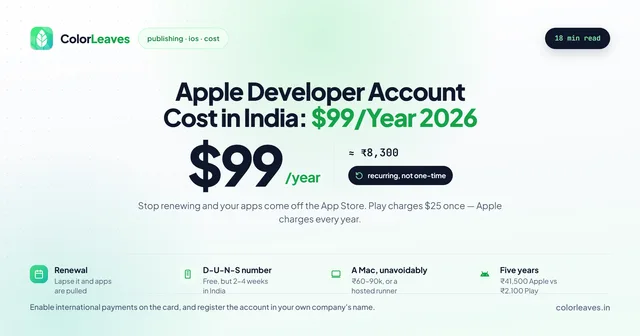
The Apple Developer Program costs $99 per year (approximately ₹8,300) (Apple). It’s annual, not one-time. Stop paying and your apps come off the App Store.
In India you can pay by credit card, debit card, or sometimes App Store balance. The fee is billed in USD.
For a deeper breakdown of Apple’s fees, the D-U-N-S requirement, and enrolling from India, see our Apple Developer account cost guide.
Individual vs Organization Enrollment
| Feature | Individual | Organization |
|---|---|---|
| Annual Fee | $99/year | $99/year |
| D-U-N-S Number | Not required | Required |
| Legal Entity | Published under your name | Published under company name |
| Team Management | Single developer | Multiple team members with roles |
| Enrollment Documents | Apple ID + Government ID | D-U-N-S + Legal documents |
| Processing Time | 24-48 hours | 1-4 weeks |
| Best For | Solo developers | Companies, agencies, startups |
D-U-N-S Number Requirement
If you’re enrolling as an organization, Apple requires a D-U-N-S (Data Universal Numbering System) number. This is a unique nine-digit identifier for businesses, issued by Dun & Bradstreet.
The good news: it’s free to get. The catch: it takes 2 to 4 weeks to process in India. Request one through Apple’s D-U-N-S lookup tool or from Dun & Bradstreet India.
Start this early. We’ve watched clients lose weeks because they didn’t know they needed a D-U-N-S number before they could even begin enrollment.
Enrollment Requirements
To enroll in the Apple Developer Program from India, you need:
- An Apple ID with two-factor authentication enabled
- Government-issued photo ID (Aadhaar, passport, PAN card)
- For organizations: D-U-N-S number, legal entity name, registered address, and authority to bind the organization legally
- A Mac (you’ll need Xcode for building and uploading, which runs only on macOS)
App Review Guidelines
Apple’s App Review has a reputation for being strict, and it’s earned. A human reviews every app and every update. They check for:
- Functionality: Your app must work as described. No crashes, broken links, or incomplete features.
- Design: Must follow Apple’s Human Interface Guidelines to a reasonable degree.
- Privacy: Must include a privacy policy URL and properly declare data collection practices.
- Content: No placeholder content, lorem ipsum text, or test data in production builds.
- Guideline 4.2 (Minimum Functionality): Your app must provide enough functionality beyond what a website could offer. Simple webview-wrapper apps get rejected frequently.
Apple publishes their App Store Review Guidelines in full. Read them before submitting. Seriously.
Review Timeline
Apple has sped up a lot over the years. In 2026 most apps clear review within 24 to 48 hours. It can run longer during peak periods (right before major holidays) or when complex functionality needs a closer look.
Cost Comparison: Play Store vs App Store
Here’s a side-by-side look at the key costs and differences:
| Factor | Google Play Store | Apple App Store |
|---|---|---|
| Account Fee | $25 one-time (~₹2,100) | $99/year (~₹8,300) |
| Renewal Cost | None | $99/year |
| Revenue Share (first $1M/year) | 15% | 15% |
| Revenue Share (above $1M/year) | 30% | 30% |
| Review Timeline | Few hours to 7 days | 24-48 hours |
| Testing Requirement | 12 testers, 14 days (new accounts) | TestFlight (optional, recommended) |
| Account Type | Individual or Organization | Individual or Organization |
| D-U-N-S Required | For Organization | For Organization |
| Number of Apps | Unlimited | Unlimited |
| Hardware Needed | Any computer | Mac required |
Both stores take the same revenue cut: 15% on the first $1 million in annual revenue, then 30% after that. This applies to in-app purchases and subscriptions. If your app is free with no in-app purchases, there’s no revenue share at all.
The boundary is where money gets lost, in both directions. Digital content sold inside the app must go through store billing: subscriptions, premium features, in-app currency, unlockable content. Physical goods and real-world services must not, and routing digital sales out to your own web checkout to dodge the cut is a rejection. The awkward middle, online courses, event tickets, video consultations, has shifted over the years and continues to, so resolve it before you build the payment flow rather than after a rejection, since rebuilding checkout is a large piece of work rather than a fix. Our guide to choosing a mobile platform covers the earlier decisions this sits downstream of.
Additional Costs Most People Forget
The account fees are just the start. Here’s what actually adds up after you hit “Publish”:
Screenshots and Promotional Graphics
Both stores need good screenshots. Doing them yourself? Great. Hiring a designer? Budget ₹5,000 to ₹20,000 for a professional set with proper frames, captions, and backgrounds.
For the Play Store feature graphic and any App Store promo assets, add another ₹3,000 to ₹10,000.
App Store Optimization (ASO) Tools
Tools like Sensor Tower, App Radar, or AppTweak help with keyword research and competitor analysis. Most have free tiers, and paid plans run $50 to $200 a month depending on the tool. Not required, but worth it if you care about organic discovery.
Privacy Policy Hosting
Both stores require a privacy policy URL. You need somewhere to host it, and your own website works fine. No website? Even a simple one-page site on free hosting will do, though a proper site for your app adds credibility.
Backend and Server Costs
If your app has a backend (API server, database, authentication, push notifications), you’ll have ongoing hosting costs:
- Firebase (Spark plan): Free for small apps
- AWS/Google Cloud/Azure: ₹2,000 to ₹50,000+ a month depending on usage
- Push notification services: free up to a threshold, then pay per message
Bug Fix and Update Maintenance
Both stores expect active maintenance. Apps left too long without updates can get flagged or pulled. Budget 15 to 20% of your initial development cost per year for app maintenance and support, bug fixes, and OS compatibility updates. Our maintenance cost guide breaks that figure down properly, and the general cost guide covers the build it is calculated against.
Two of those are hard deadlines rather than good practice. Google raises the target API level requirement every year, and apps that miss it stop reaching new users on current devices, which means at least one compliance release annually before a single feature is added. And the Apple membership renews yearly, so if the payment fails your apps come off the store until you pay.
Getting Paid, Which Registration Does Not Cover
Skipped by nearly every guide and it stops more launches than the fees do.
Registering lets you publish. It does not let you collect money. Selling a paid app, a subscription or anything through in-app purchase needs a separate set of agreements: on Apple the Paid Applications agreement plus tax forms and bank details, and on Google a linked payments profile. An Indian entity needs a W-8BEN-E so Apple does not withhold US tax, plus GST information.
None of it is difficult. All of it takes longer than expected when somebody starts it the week of launch, particularly if the person who has to sign is away.
Worth knowing what actually requires it. Digital content sold inside the app goes through the stores’ billing at 30 percent, or 15 percent under the small business programmes. Physical goods and real-world services do not. If you are building an ecommerce app that ships things, or an on-demand product, you use a normal payment gateway and the stores take nothing. Implementing in-app purchase there anyway is itself a rejection, which happens often enough to be worth naming.
The Device Matrix You Will Need Anyway
Not a store fee, and it belongs on this list because it is the cost most often cut and most often regretted.
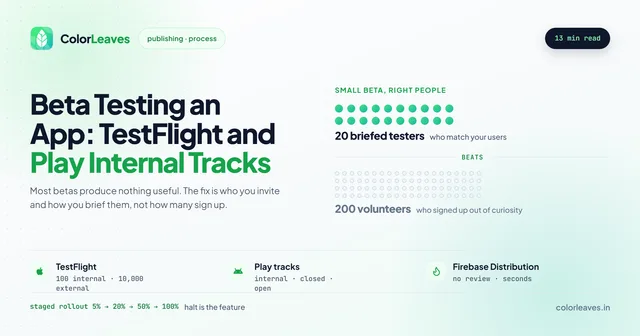
Reviewers test on real hardware, and one reproducible crash is a rejection. More to the point, so do your users. Five or six devices chosen deliberately, a current flagship, a mid-range handset a few years old, a genuinely low-memory device, a Samsung and a Xiaomi, runs ₹60,000 to ₹1,00,000 and lasts three or four years. Our piece on Android device fragmentation covers choosing them, and getting a build through a Play internal track or TestFlight before submission surfaces the obvious problems days before they can cost you a review cycle.
Common Rejection Reasons (and How to Avoid Them)
A rejection sets you back days. Here’s what trips people up on each platform.
Google Play Store Rejections
- Policy violations: Using permissions you don’t need (SMS, Call Log access without justification), requesting background location without a valid use case.
- Deceptive behavior: App functionality doesn’t match what’s described in the listing. Misleading screenshots or descriptions.
- Intellectual property: Using copyrighted logos, names, or content without permission.
- Data safety form issues: Inaccurate data safety declarations. Google cross-checks this with your app’s actual behavior.
- Target API level: Your app must target a recent Android API level. As of 2026, new apps must target at least API level 34.
Apple App Store Rejections
- Bugs and crashes: Even one reproducible crash during review can cause rejection. Test thoroughly.
- Broken links: Every URL in your app must work, including privacy policy and terms of service links.
- Placeholder content: No “coming soon” features, lorem ipsum text, or test data.
- Privacy issues: Not properly requesting permissions, missing privacy policy, or not declaring data collection accurately in App Store Connect.
- Guideline 4.2 (Minimum Functionality): This is the most common rejection for first-time publishers. If your app is essentially a wrapper around a website, it will be rejected. Your app needs to provide genuine native functionality.
- Incomplete metadata: Missing screenshots for required device sizes, incomplete descriptions, or wrong category selection.
The best prevention? Test your app as if you’re the reviewer. Try to break it. Check every link. Read through the guidelines of the store you’re targeting.
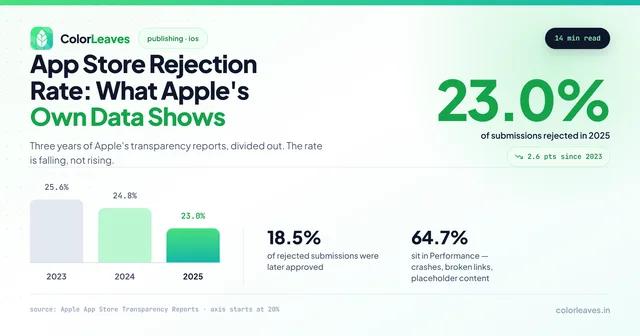
Worth knowing how likely this is rather than treating it as a remote possibility. Apple’s own transparency reports put the rejection rate at roughly one in four submissions, and the categories are not evenly weighted: two thirds sit in Performance, which is crashes and incomplete information rather than judgement calls. The average rejected submission also breaks 1.3 guidelines at once, so fixing the one thing the reviewer mentioned is often not enough, and it is cheaper to audit against the whole guideline set before resubmitting than to discover the second problem three days later. Our fuller guide to why apps get rejected covers each guideline in turn.
Some categories get scrutinised harder than the list above suggests. Anything financial is expected to be submitted by the institution rather than by an agency, and Apple will ask what regulatory permissions you operate under. Anything medical gets asked for the clinical basis behind diagnosis or dosage claims. Products aimed at children face the Kids category rules, which ban third-party analytics and advertising outright and matter to any education product. And anything where users can post to each other needs moderation, reporting and blocking before it will pass, which catches property listing apps that never thought of themselves as social.
Budget a week between submission and any announced date, and two for the categories above.
Step-by-Step Publishing Process
Publishing on Google Play Store
- Create a Google Play Developer account at play.google.com/console and pay the $25 fee
- Complete identity verification (government ID, address proof)
- Create your app in the Play Console: set the default language, app name, and app type (app or game)
- Set up the store listing: add description, screenshots, feature graphic, and categorization
- Complete the content rating questionnaire
- Set up pricing and distribution: choose free or paid, select target countries
- Fill out the data safety form: declare what data your app collects and how it’s used
- Upload your signed AAB (Android App Bundle). APKs are no longer accepted for new apps
- For new accounts: set up a closed testing track, add 12+ testers, and wait 14 days
- Submit for review on the production track once testing requirements are met
- Wait for review, typically a few hours to 7 days
- App goes live once approved
Publishing on Apple App Store
- Enroll in the Apple Developer Program at developer.apple.com and pay the $99 annual fee
- Complete enrollment verification. For organizations, have your D-U-N-S number ready
- Build your app in Xcode and archive it
- Create an App Store Connect entry: set the app name, bundle ID, SKU, and primary language
- Upload your build through Xcode or Transporter
- Complete the app information: descriptions, keywords, screenshots for all required device sizes, categories, and age rating
- Set pricing and availability: choose a price tier (or free) and target countries
- Add your privacy policy URL and fill out the App Privacy section
- Submit for review: select the build you uploaded and hit “Submit for Review”
- Wait for review, usually 24 to 48 hours
- App goes live after approval (you can choose automatic or manual release)
Frequently Asked Questions
How much does it cost to launch an app on the Play Store?
Launching an app on the Google Play Store costs $25 (about ₹2,100) as a one-time fee, with no annual renewal. New developer accounts also need to complete a 14-day closed test with at least 12 testers before the app can go live.
How much does a Google Play developer account cost in India?
A Google Play developer account costs $25 (approximately ₹2,100) as a one-time fee. There are no annual renewal costs. This gives you lifetime access to publish unlimited apps on the Play Store. Payment needs to be made with an internationally enabled debit or credit card.
Is the Apple Developer Program fee annual?
Yes. The Apple Developer Program costs $99/year (approximately ₹8,300). If you don’t renew, your existing apps will be removed from the App Store. You can renew up to 30 days before your membership expires. Both individual and organization accounts pay the same annual fee.
Can I publish apps on both stores simultaneously?
Technically yes, but the two processes run separately. You’ll need a developer account on each platform, and each store handles review on its own timeline. Plenty of teams stagger the launch, pushing to one store first and the other a bit later. Building with a cross-platform framework like Flutter or React Native? The app code may be shared, but the submission and review stay completely independent.
How long does app review take?
On Google Play, reviews usually take a few hours to 7 days, and updates often clear faster. On the Apple App Store, most finish within 24 to 48 hours. Both can run longer for new developer accounts, apps in sensitive categories, or during peak submission periods.
What is the new Google Play testing requirement?
Starting in late 2023 and strictly enforced through 2025-2026, Google requires new developer accounts to complete a closed testing phase before gaining production access. You need a minimum of 12 testers who opt in and install your app, and the testing must run for at least 14 consecutive days. This doesn’t apply to existing developer accounts that already have production access.
Do I need a company to publish on the App Store?
No. Both Google Play and Apple allow individual developer accounts, so you can publish under your personal name without registering a company. Want your apps published under a company name instead (more professional, builds user trust)? You’ll need an organization account. On Apple that means a D-U-N-S number. On Google Play it means business verification.
Let Color Leaves Handle Your App Publishing
Publishing sounds simple on paper. In practice it’s full of small details that can push your launch back by weeks: rejected builds, incomplete metadata, a missing D-U-N-S number, or finding out about the 14-day testing requirement the day you planned to go live.
At Color Leaves, publishing is part of our Android, iOS, React Native, and Flutter app development services. Launching a startup product? We build MVP apps and get them store-ready too. Setting up developer accounts, polishing store listings, clearing compliance, managing the review back-and-forth: we handle all of it so you can stay focused on your business.
We’ve published 50+ apps across both stores and we know what reviewers look for, including StockGenie, a finance app that went through the stricter review path on both. Ready to get your app live? Get in touch and let’s make it happen.
One thing to settle before any of this, whoever builds your app. The developer accounts should be registered to your company rather than to a development partner. Published under an agency’s account, the listing, the ratings history, the install base and the right to ship an update belong to them, and on Android losing access to the signing key means you cannot update your existing users at all. Our guide to who owns your code covers this alongside the repository and cloud accounts, and the contract checklist covers the clause that prevents it. Ask this of every firm you evaluate, including us, and our guide to choosing a development company covers the rest of that conversation.
Getting Published Without the Rejections
Roughly a fifth of App Store submissions get rejected, and almost none of it is about code quality. It is privacy labels that do not match what your SDKs actually collect, missing in-app account deletion, or a sign-in flow offering Google without Sign in with Apple alongside it.
We run a guideline audit before submitting rather than discovering these during review. If you are publishing from outside India, our iOS app development in India page covers how we handle review correspondence, and hiring app developers explains the dedicated team route.